
Who this is for and what it does
Requestors, Admins and Org Users use this when a booked appointment is no longer needed. Admins can cancel any appointment in their organization; Requestors and Org Users can cancel the appointments they booked. Once cancelled, the interpreter is told and the appointment stays in your list with its new status.
Before you start
-
Cancel as early as you can. Your organization's agreement sets how much notice avoids a charge; if you are not sure what it is, ask your Piedmont Global account contact.
-
Know the reason for cancelling. You must choose one.
Steps
-
Open Appointments and select the appointment.
-
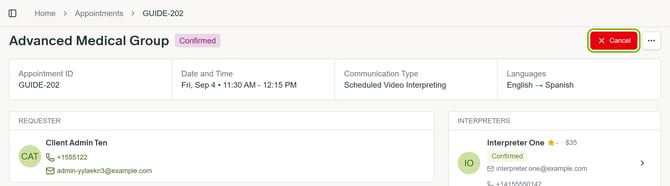
At the top of its page, select Cancel.
-
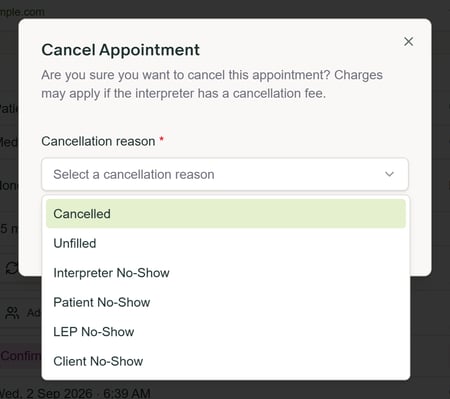
In the Cancel Appointment window, open Cancellation reason and choose the reason that is true:
Cancelled: the appointment is no longer needed.
LEP No-Show: the person who needed the interpreter did not attend.
Client No-Show: nobody from your organization joined.
Patient No-Show: the patient did not attend.
Unfilled: no interpreter was found for it.
Interpreter No-Show: the interpreter did not attend.
You may see fewer reasons; the list follows your organization's agreement.
-
Select Yes, cancel. Select No, close. instead to keep the appointment.
What you will see
A message reads "Appointment cancelled!" and the appointment's status changes to Cancelled, or to Unfulfilled if you chose Unfilled or Interpreter No-Show. The Cancel button is no longer shown. A cancellation cannot be undone; if you still need an interpreter, book a new appointment.
When a charge still applies. Your organization's agreement decides it. A charge usually applies when the appointment is cancelled inside the agreed notice period before its start, or for a no-show, depending on the reason. If an interpreter is already assigned, the window reminds you: "Charges may apply if the interpreter has a cancellation fee." Questions about a specific charge go to Piedmont Global with Submit a request.
Things that most often look wrong, and why:
-
There is no Cancel button. The appointment is already Completed, Cancelled or Unfulfilled, it was an on-demand call, or someone else booked it and you are not an Admin.
-
Yes, cancel. stays greyed out. Choose a Cancellation reason first.
-
"Failed to cancel appointment". The cancellation did not go through. Try again; if it fails again, use Submit a request and give the Appointment ID.
-
I need to cancel every date of a recurring appointment. Cancel one date from its own page as above. To cancel the whole series, ask Piedmont Global with Submit a request.
Available since March 2026
Last updated 13 October 2026