
Who this is for and what it does
Anyone at a client organization who needs a list of interpreter calls for a period, for example for a monthly review. Requestors and Org Users get only the calls they requested. Client Admins get the whole organization's calls and can choose requesters. Org Admins get every call at the location they are working for.
Steps
In the sidebar, select Reports, then Call Basics Reports.
Select Generate Report.
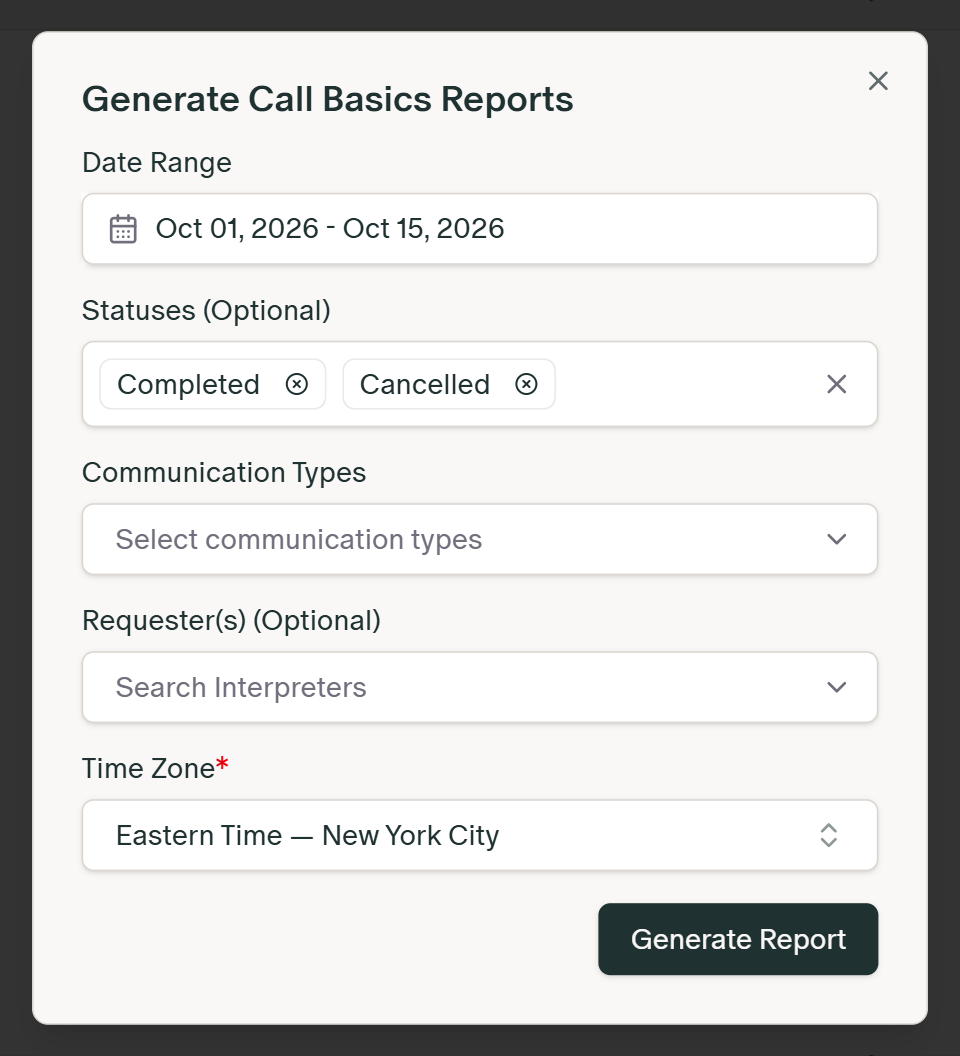
Set the Date Range. It starts as the month to date.
Under Statuses (Optional), keep Completed and Cancelled or change them. Clear them all to include every status.
Under Communication Types, choose the call types, or leave it empty for all.
Client Admins: under Requester(s) (Optional), choose people in your organization, or leave it empty for everyone.
Check Time Zone. It starts as your computer's time zone.
Select Generate Report.
When the report's Status reads Ready, select Download. The file opens in a new tab.
What you will see
A message reads "Report request submitted" and "Report will be available in a short while." The report shows Generating, and the list refreshes by itself until it is Ready.
Hover over a report's Filters to see what it was run with.
Things that most often look wrong, and why:
The report says Failed. Run it again. If it fails again, contact Piedmont Global with the dates and filters you used.
The download did not open. Your browser may have blocked the new tab. Allow pop-ups for Connexus and select Download again.
The report has cancelled appointments in it. Cancelled is included by default. Remove it under Statuses.
Available since March 2026. Updated in Release 11.20.2026.
Last updated 23 November 2026