
Who this is for and what it does
Org Admins and Org Users who work for several locations of one organization, such as several clinics or offices. Each location is its own account in Connexus.
Steps
If the sidebar is collapsed, expand it.
Select your name at the top of the sidebar.
Under Switch client accounts, select the location.
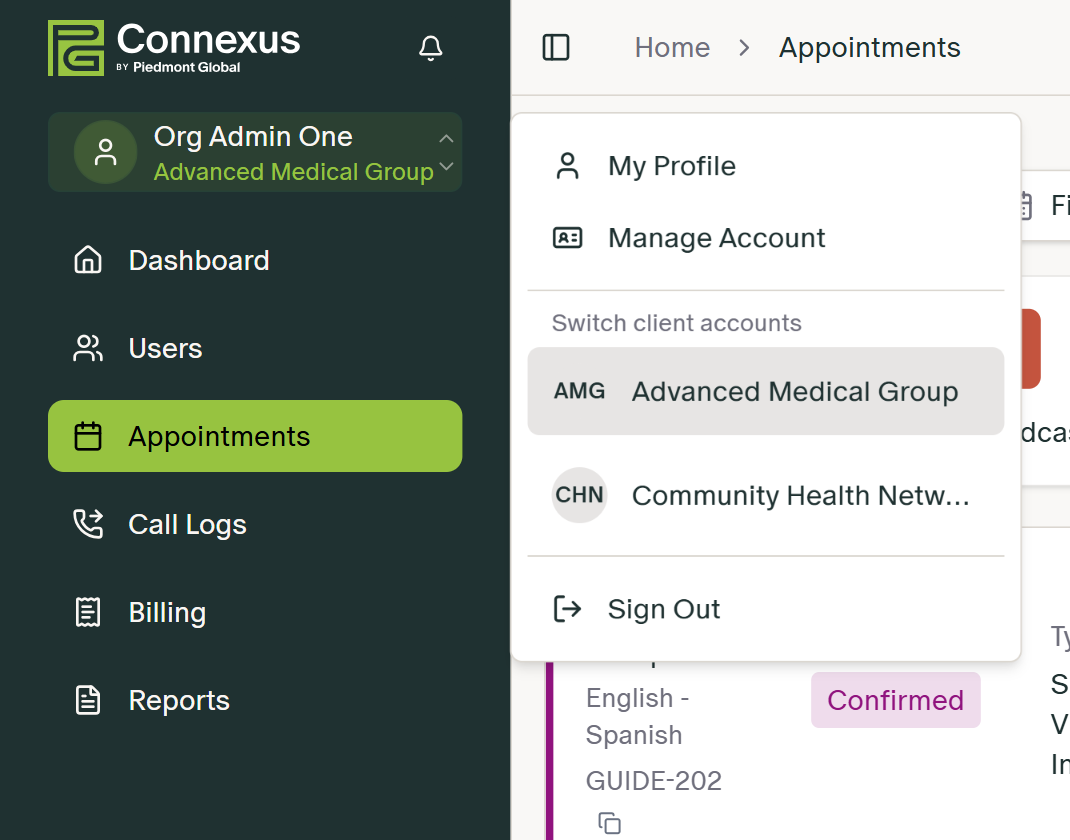
The page reloads for that location.
What you will see
The location you are working for shows under your name. Appointments, Call Logs, Users, Billing and Reports all show that location only.
Connexus remembers your choice in this browser. The first time, it opens the first location in your list.
What you can do at each location depends on your role: see "What each role can do in your organization".
Things that most often look wrong, and why:
"Select a client" shows under my name. No location is chosen yet. Choose one under Switch client accounts.
"Your organization has no client accounts assigned yet". No locations are linked to your account. Contact Piedmont Global to link them.
A location is missing from the list. It is not assigned to you. Contact Piedmont Global.
Available since March 2026
Last updated 14 October 2026